
When you type a question into an AI assistant and it writes back, that live process is called inference. It is different from training, the one-time process of building the model. This guide explains what happens the moment you hit send — and what makes an answer feel fast, slow, or expensive.
Training vs. inference: two very different jobs
Training is how a model learns: it repeatedly guesses the next token, checks the guess against real text using a loss function, and nudges its internal parameters to do better — over millions of examples. 1 It is done once, on large hardware, and is very costly. Inference is what happens afterward, every time someone uses the model. The parameters are now fixed; no learning takes place. The model simply takes your prompt and produces output tokens.
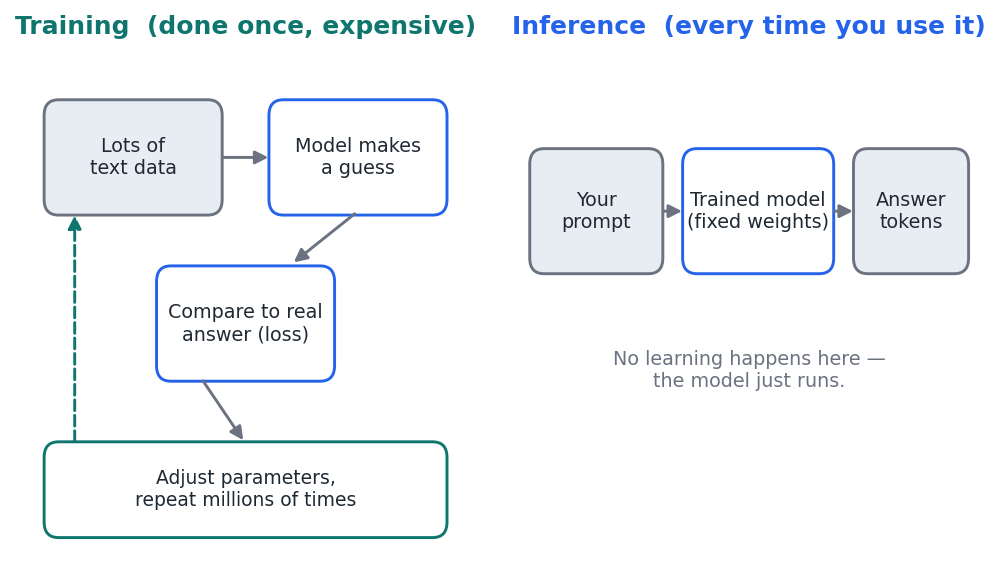
Figure 1 — Training builds the model once; inference runs the finished model every time you use it.
What happens when you send a prompt
Inference runs in two phases with very different characteristics.
- Prefill. The model reads your entire prompt at once and processes it in parallel to produce the very first output token. How long this takes is called Time to First Token (TTFT) — the wait before anything appears on screen. 4
- Decode. The model then generates the rest of the answer one token at a time, each new token depending on all the previous ones. The gap between tokens is the Time Per Output Token (TPOT); it is what you see as text streaming out. 4
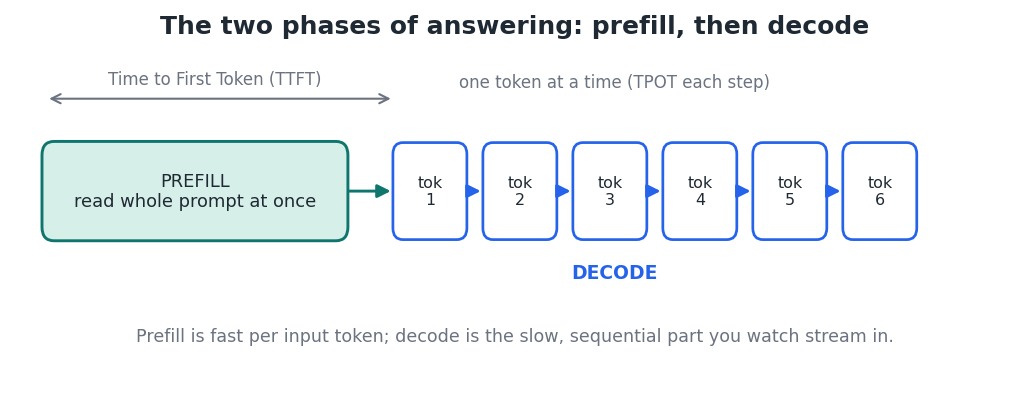
Figure 2 — Prefill produces the first token; decode streams the rest sequentially.
Because prefill handles many input tokens together but decode must run step by step, decode is the slower, sequential bottleneck. 2 This split also explains a billing detail you will see later in this series: providers charge much less for input (prefill) tokens than for output (decode) tokens. 3
Latency vs. throughput
Two words describe inference performance. Latency is how quickly one user gets a result. Throughput is how much total work the system handles across many users at once. 3 They pull against each other: grouping many requests together (batching) raises throughput and lowers cost per user, but can add a little waiting for any single request.
What makes inference fast, slow, or costly
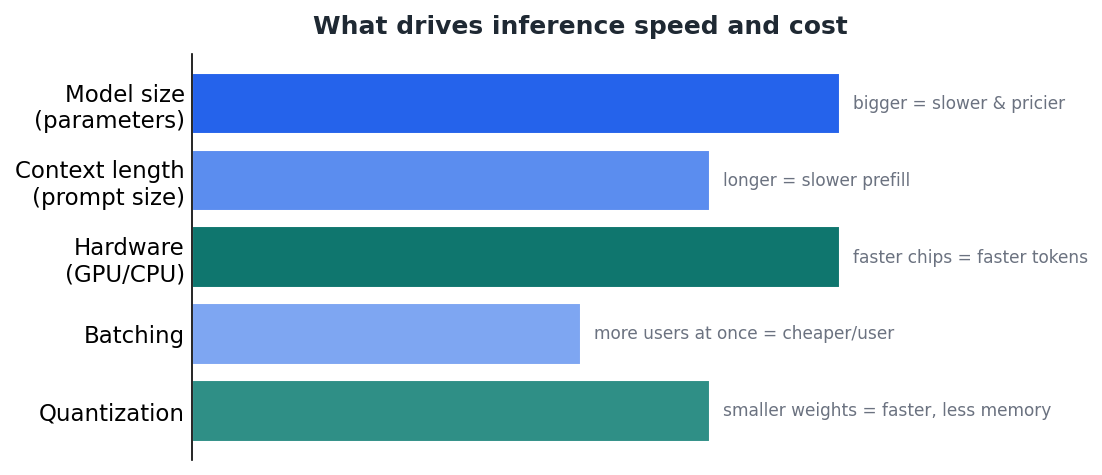
Figure 3 — The main levers that determine how fast and how expensive an answer is.
A few factors dominate. Larger models (more parameters) are smarter but slower and pricier to run. Longer prompts make prefill take longer. Faster hardware (a capable GPU) produces tokens more quickly. Serving many requests together (batching) improves efficiency. And quantization — storing the model's numbers at lower precision — shrinks memory use and speeds things up, at a small accuracy cost. These trade-offs return throughout this series.
Where inference runs
The same model can be served in different places: a cloud provider's API, a company's own servers, or even your own computer. Each choice changes speed, cost, privacy, and control — the subjects of the next two guides in this series.
Key takeaways
- Inference is running a finished model to answer a prompt; training is the separate, one-time process of building it.
- Answering has two phases: prefill (produces the first token, measured by TTFT) and decode (streams the rest, measured by TPOT). 4
- Decode is the slow, sequential part — which is why output tokens cost more than input tokens. 3
- Model size, prompt length, hardware, batching, and quantization are the biggest levers on speed and cost.


