
A single DGX Spark holds models up to ~200B parameters. To go further — a 405B model that needs ~200 GB, or distributed training — you link nodes into a cluster. NVIDIA publishes official step-by-step playbooks for exactly this, and this guide follows them to build a two-node cluster. 1
Why cluster
Two reasons. First, capacity: a model larger than one node's 128 GB is sharded across nodes. Second, distributed training: splitting a training job across nodes shortens it — community benchmarks report ~1.87× speedup on two nodes at ~93.5% scaling efficiency. 5
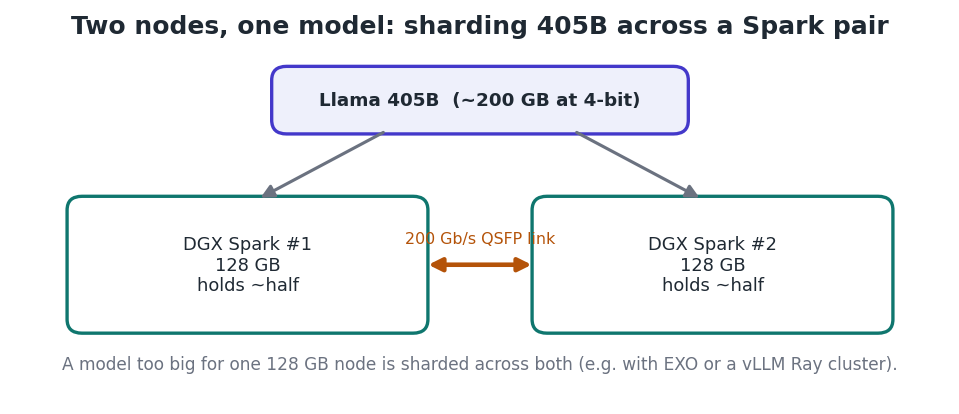
Figure 1 — A 405B model is split across two Sparks, joined by a 200 Gb/s link.
The topologies NVIDIA supports
NVIDIA's playbooks cover several layouts: two nodes connected directly, three nodes in a ring, and four or more nodes through a switch. 1 Two-node direct is the simplest and needs no switch at all.
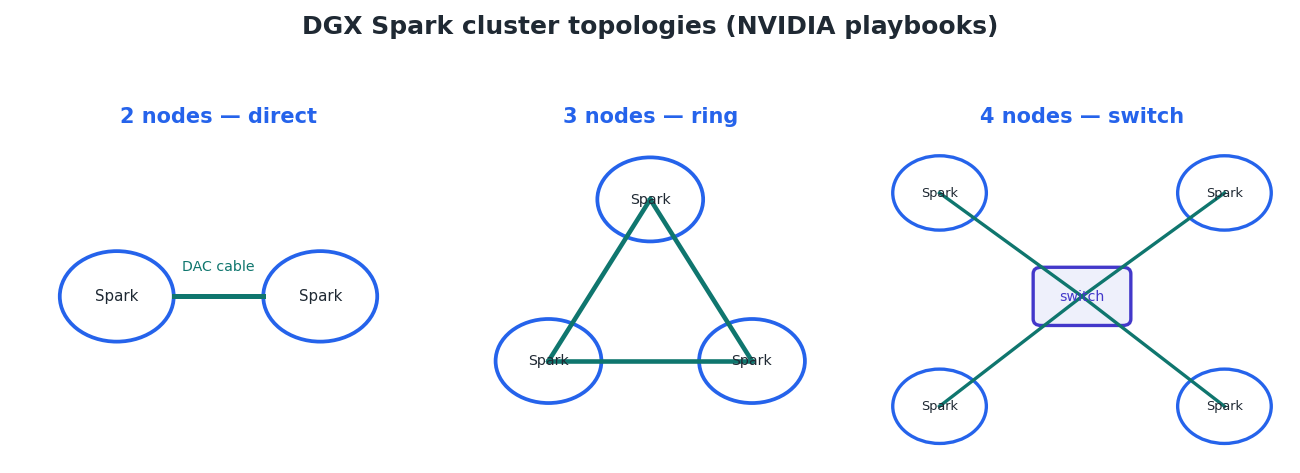
Figure 2 — Cluster topologies from the NVIDIA DGX Spark playbooks.
Project — Build a two-node DGX Spark cluster
Prerequisite This project follows NVIDIA's official “Connect Two Sparks” and multi-node vLLM playbooks. Have both Sparks on the same, up-to-date DGX OS image.
- Cable the two units. Connect a single 200G QSFP56 passive DAC cable (e.g. Amphenol NJAAKK0006, 0.5 m) between the ConnectX-7 ports — the same port number on both units, or the link won't come up. No switch is needed for two nodes. 3
- Update firmware and drivers. Bring the ConnectX-7 / mlx5 firmware and the dgx-spark-mlnx-hotplug package current on both nodes before configuring the link. 3
- Configure the cluster network. Apply NVIDIA's netplan file for the CX-7 interface on both nodes (or assign static IPs manually):
sudo wget -O /etc/netplan/40-cx7.yaml \
  https://github.com/NVIDIA/dgx-spark-playbooks/raw/main/nvidia/connect-two-sparks/assets/cx7-netplan.yaml
sudo chmod 600 /etc/netplan/40-cx7.yaml
sudo netplan apply- Set up passwordless SSH. Exchange SSH keys so the head node can reach the worker without a password — required for distributed launches.
- Serve a large model — option A: EXO. EXO shards a model across both nodes automatically and exposes an OpenAI-compatible API. Run it on both nodes:
On BOTH nodes
cd /opt/exo && uv run exoThen query the cluster from anywhere on the network
curl http://<head-node-ip>:52415/v1/chat/completions \
  -H 'Content-Type: application/json' \
-d '{"model":"llama-3.1-405b-4bit","messages":[{"role":"user","content":"Hello"}]}'- Serve a large model — option B: vLLM Ray cluster. For production-style serving, NVIDIA's “Stacked Sparks” playbook starts a Ray cluster from an NGC container and runs vLLM across both nodes with tensor/pipeline parallelism:
On both nodes: pull the NGC vLLM image
docker pull nvcr.io/nvidia/vllm:25.11-py3Download NVIDIA's Ray cluster launcher, then start head (node 1) / worker (node 2)
wget https://raw.githubusercontent.com/vllm-project/vllm/refs/heads/main/examples/ray_serving/run_cluster.sh
chmod +x run_cluster.sh
Follow the playbook for the exact head/worker arguments and the vLLM serve command with tensor- and pipeline-parallel sizes. How it works Under the hood, multi-node work uses MPI for CPU coordination and NCCL (tuned for Grace Blackwell) for GPU-to-GPU collectives across the 200 Gb/s link.
The Mac alternative
Apple Silicon Macs can also be clustered. Tools like EXO pool several Macs' unified memory over Thunderbolt or Ethernet, using the MLX runtime, to run a model larger than any one machine — the same sharding idea without CUDA. It's a flexible, heterogeneous option, though bandwidth between machines is lower than a Spark's dedicated 200 Gb/s fabric.
Scaling beyond two nodes
The same playbooks extend to a three-node ring (efficient for the all-reduce operations in distributed training) and to four or more nodes through a switch, configured with NVIDIA's spark_cluster_setup script. 1 3
Key takeaways
- Cluster nodes to exceed one node's memory (e.g. 405B across two Sparks) or to speed up training. 5
- Two Sparks link directly with one 200G QSFP DAC cable — no switch — following NVIDIA's official playbooks. 2
- Serve big models with EXO (simple, auto-sharding) or a vLLM Ray cluster (production); NCCL handles GPU collectives. 4
- Apple Silicon Macs can be clustered with EXO/MLX over Thunderbolt as a CUDA-free alternative.


