
Buying hardware isn't the only path. RunPod is a GPU cloud that rents you anything from a consumer RTX 4090 to a data-center H200 by the second, so you can run a big job without owning the card. This guide explains its two products, what they cost, and when renting beats buying. Prices below are a September 2026 snapshot and change often — confirm live rates on RunPod's pricing page before budgeting.
Two ways to rent: Pods and Serverless
A Pod is a GPU you rent and keep running — you control the whole environment, ideal for training and long sessions. Serverless spins workers up on demand and scales to zero between requests, billing only for active compute — ideal for bursty inference. 2
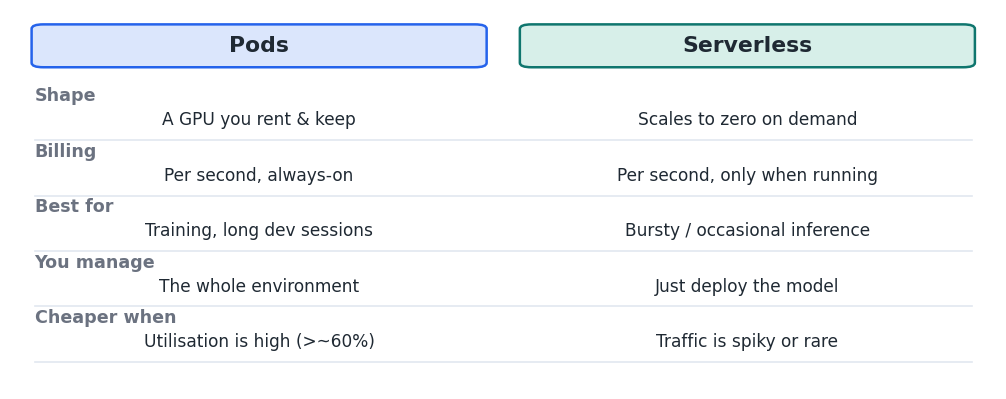
Figure 1 — Pods are always-on rentals; Serverless scales to zero and bills only while running.
Pods come in two tiers: Community Cloud (third-party hosts, cheapest, less predictable) and Secure Cloud (RunPod's own data centers, higher price, uptime guarantees). 5
What it costs
GPU VRAM Secure Pod ($/hr) Serverless ($/active hr) RTX 4090 24 GB $0.69 ~$1.10 A100 80 GB $1.39 ~$2.72 H100 PCIe 80 GB $2.89 ~$4.55 H200 141 GB $4.39 ~$5.93 Community Cloud pods are cheaper still — e.g. an RTX 4090 at ~$0.34/hr and an H100 at ~$1.99/hr. Billing is per second. Network storage is ~$0.07/GB-month; there are no data ingress/egress fees, and a default spend cap of $80/hr applies.
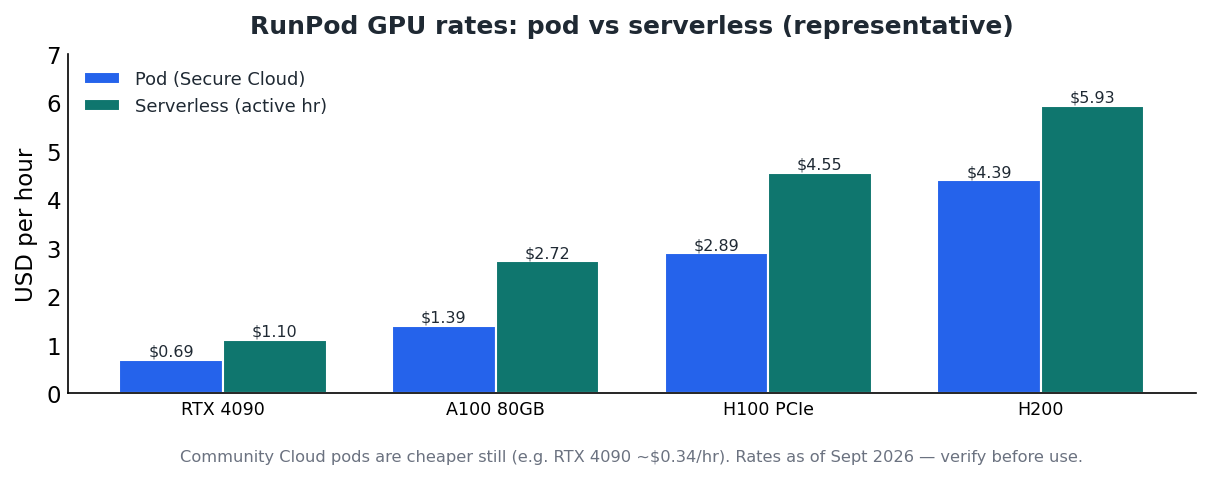
Figure 2 — Serverless costs more per active hour but charges nothing while idle.
Worked examples
- Fine-tune for an afternoon. Three hours on a Secure H100 ≈ 3 × $2.89 ≈ $8.70.
- A weekend of experiments. ~20 active hours on a Community RTX 4090 ≈ 20 × $0.34 ≈ $6.80.
- Always-on vs on-demand. Above ~370 active GPU-hours/month, a dedicated Pod is cheaper than Serverless; below that, Serverless wins because idle time is free. 3
Launching a pod — the basic workflow
- Create an account and add credit. Load a small balance to start.Referral link: bitwidth.ai gets RunPod credit if you sign up through it.
- Pick a tier and GPU. Choose Community or Secure Cloud, then a GPU sized to your model (don't default to an H100 if a 4090 fits).
- Choose a template and deploy. Select a ready-made image (e.g. PyTorch or a vLLM template) and start the pod.
- Connect. Use the web terminal, SSH, or a Jupyter link to reach the machine.
- Run your job. Pull your model or code and train or serve as you would locally.
- Terminate when done. Stop or delete the pod immediately — this is the single biggest cost lever. 3
Tip Billing is per second and there's no egress fee, but persistent volumes keep charging while idle. Terminate pods you're not using and right-size the GPU to the model.
Rent or buy?
- Rent when: you need a big GPU occasionally, want to train or fine-tune in bursts, or must run a model larger than your own hardware can hold.
- Buy when: you use AI heavily every day (the flat cost of owning wins), or your data must never leave your premises — see the Level 1 pricing and Level 2 hardware guides.
Key takeaways
- RunPod rents GPUs by the second as Pods (persistent) or Serverless (scale-to-zero). 2
- Community Cloud is cheapest; Secure Cloud adds reliability; representative Secure rates run ~$0.69/hr (4090) to ~$4.39/hr (H200). 1
- Serverless wins for bursty inference; a dedicated Pod wins above ~370 active hours/month. 3
- Terminate pods when idle and right-size the GPU — cost discipline matters more than the card you pick.


