

There are two ways to pay for cloud AI. A subscription is a flat monthly fee for a chat or coding assistant. An API lets your own software call a model and bills you per token. This guide covers both — consumer chat apps, coding assistants (Cursor, GitHub Copilot, and others), and developer APIs — with prices verified against official pages in the browser as of September 12, 2026.
Prices change often. Confirm on each provider’s pricing page before you budget.
How API billing works
APIs charge by the token (a chunk of text, often roughly three-quarters of a word). You pay separately for input (your prompt) and output (the model’s reply), usually quoted per million tokens. Output is almost always several times more expensive than input. Many providers also list a cheaper cached input rate when a prompt prefix is reused.
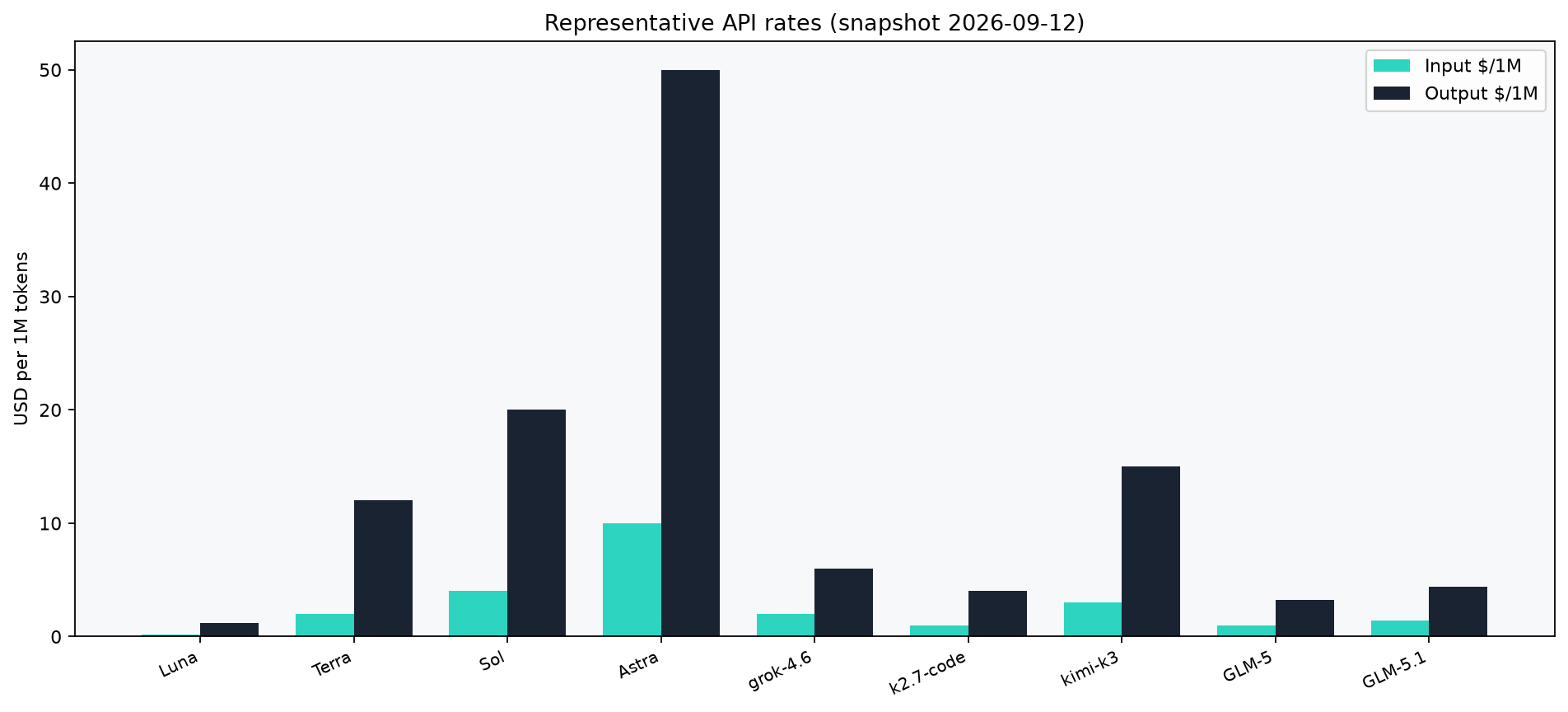
Figure 1 — Representative API rates per million tokens (input / output). Snapshot 2026-09-12.
Representative API rates (per 1M tokens)
For Kimi rows, Input is the cache-miss rate (cache-hit is cheaper).
- OpenAI GPT-5.6 Luna — $0.20 in / $1.20 out — openai.com/api/pricing
- OpenAI GPT-5.6 Terra — $2.00 in / $12.00 out — same
- OpenAI GPT-5.6 Sol — $4.00 in / $20.00 out — same
- OpenAI GPT-6 Astra — $10.00 in / $50.00 out — same
- xAI grok-4.6 — $2.00 in / $6.00 out — docs.x.ai/docs/models
- Kimi kimi-k2.7-code — $0.95 in / $4.00 out — platform.kimi.ai
- Kimi kimi-k3 — $3.00 in / $15.00 out — same
- Z.ai GLM-5 — $1.00 in / $3.20 out — docs.z.ai pricing
- Z.ai GLM-5.1 — $1.40 in / $4.40 out — same
Cached-input rates differ by model (for example OpenAI Luna cached input $0.02 / 1M, Kimi kimi-k3 cache hit $0.30 / 1M, Z.ai GLM-5.1 cached input $0.26 / 1M). Anthropic Claude and Google Gemini API dollar amounts are not listed in this snapshot’s browser captures — check anthropic.com/pricing and ai.google.dev for live API tables.
What a task actually costs
Everyday API calls are still fractions of a cent:
- One chat question (500 in / 400 out) — ~$0.0006 on Luna; ~$0.006 on Terra
- Summarize a 5-page report (4,000 in / 800 out) — ~$0.002 on Luna; ~$0.018 on Terra
- Draft from a long brief (20,000 in / 2,000 out) — ~$0.006 on Luna; ~$0.064 on Terra
Math: (input_tokens/1e6)×input_rate + (output_tokens/1e6)×output_rate. Rounded. Cheap = GPT-5.6 Luna; Mid = GPT-5.6 Terra.
Subscriptions: chat apps
If you mainly chat in a browser or app, a subscription is simpler than wiring an API.
OpenAI ChatGPT
From OpenAI’s ChatGPT pricing page: 1
- Free — $0/mo — limited
- Go — $8/mo — expanded Instant access
- Plus — $20/mo — higher limits
- Pro — from $100/mo — highest ChatGPT tier in this capture
Anthropic Claude
From Anthropic’s pricing page: 2
- Free — $0
- Pro — $20/mo monthly; $17/mo ($200 billed up front) annual — more usage
- Max — from $100/mo — higher usage options
Google AI / Gemini
From Google One AI (US monthly): 3
- Google AI Plus — $4.99/mo after promo ($1.29/mo for first 3 months) — mid tier
- Google AI Pro — $19.99/mo after promo ($4.99/mo for first 3 months) — higher Gemini limits
- Google AI Ultra — starting at $99.99/mo — highest limits
Grok / xAI (consumer)
From x.ai/pricing:
- Free — $0 — limits
- SuperGrok — $30/mo — higher limits
- SuperGrok Plus — $100/mo — higher usage
Lite and Heavy appear in the comparison UI, but no dollar amounts were visible in this capture — confirm on the live page before budgeting those tiers.
Kimi membership
From Kimi membership pricing: 4
- Moderato — $19/mo — billed monthly
- Allegretto — $39/mo — billed monthly
- Allegro — $99/mo — billed monthly
- Vivace — $199/mo — billed monthly
Subscriptions: coding assistants
Cursor
From Cursor pricing: 5
- Hobby — Free — limited Agent
- Pro — $20/mo
- Pro+ — $60/mo
- Ultra — $200/mo
- Teams Standard — $40/user/mo
- Teams Premium — $120/user/mo
- Enterprise — custom
Plan details and included model pools are also summarized on Cursor models and pricing docs.
GitHub Copilot
From GitHub Copilot pricing / plans docs: 67
- Free — $0 — limited
- Pro — $10/user/mo
- Pro+ — $39/user/mo
- Max — $100/user/mo
- Business — $19/seat/mo — org
- Enterprise — $39/seat/mo — enterprise
Z.ai Coding Plan
The Z.ai Coding Plan overview documents Lite / Pro / Max features and usage. Confirm Lite/Pro/Max dollar amounts on the live page — see docs.z.ai/devpack/overview rather than assuming a monthly price.
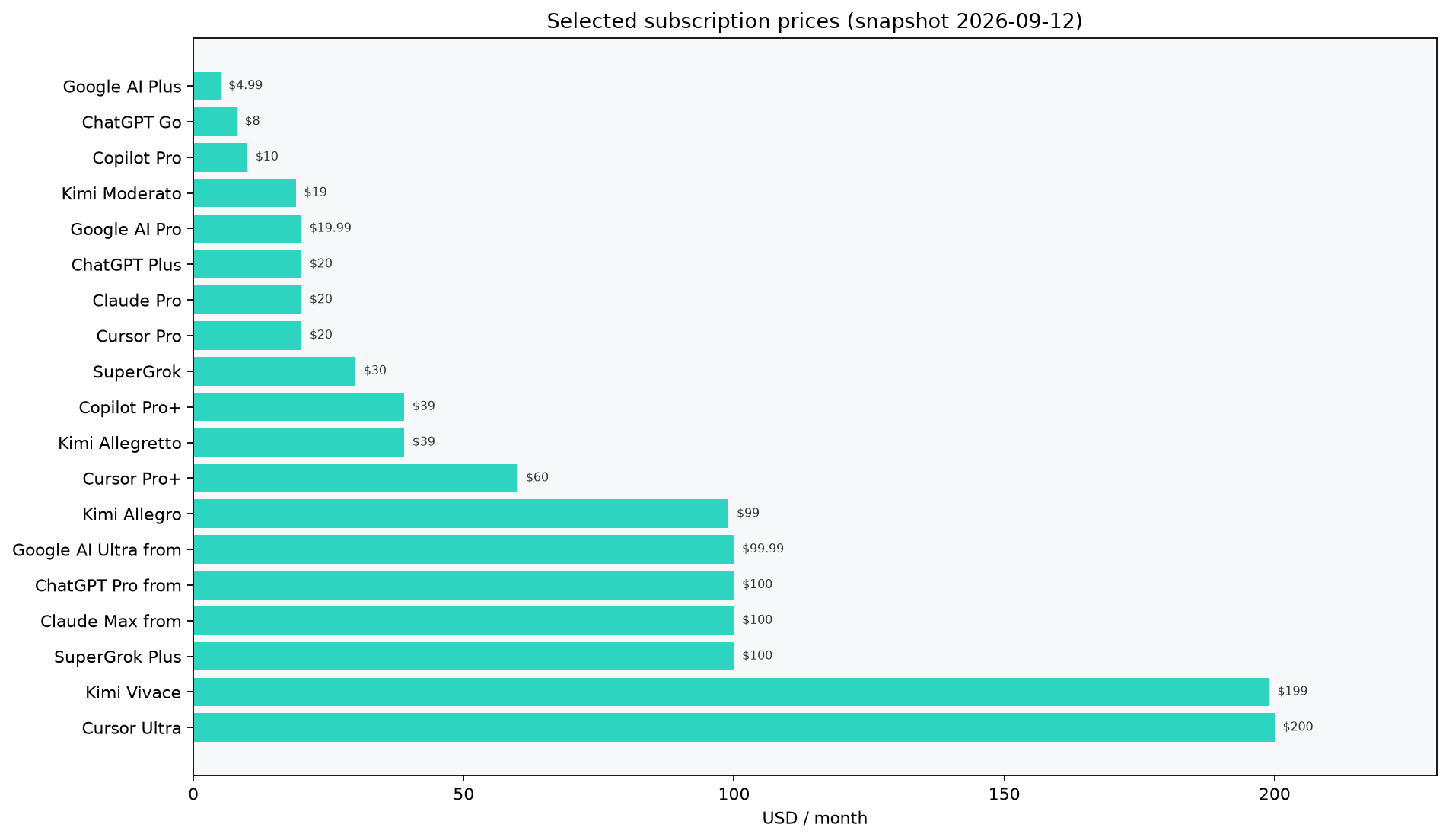
Figure 2 — Subscription comparison (selected plans, USD/mo). Snapshot 2026-09-12.
Subscription or API — which to choose?
A subscription is a predictable flat fee and needs no code — good for interactive chat and IDE assistants. An API is pay-for-what-you-use — good for products and automation. Light API use stays cheap; heavy daily chatting is often cheaper on a flat plan.
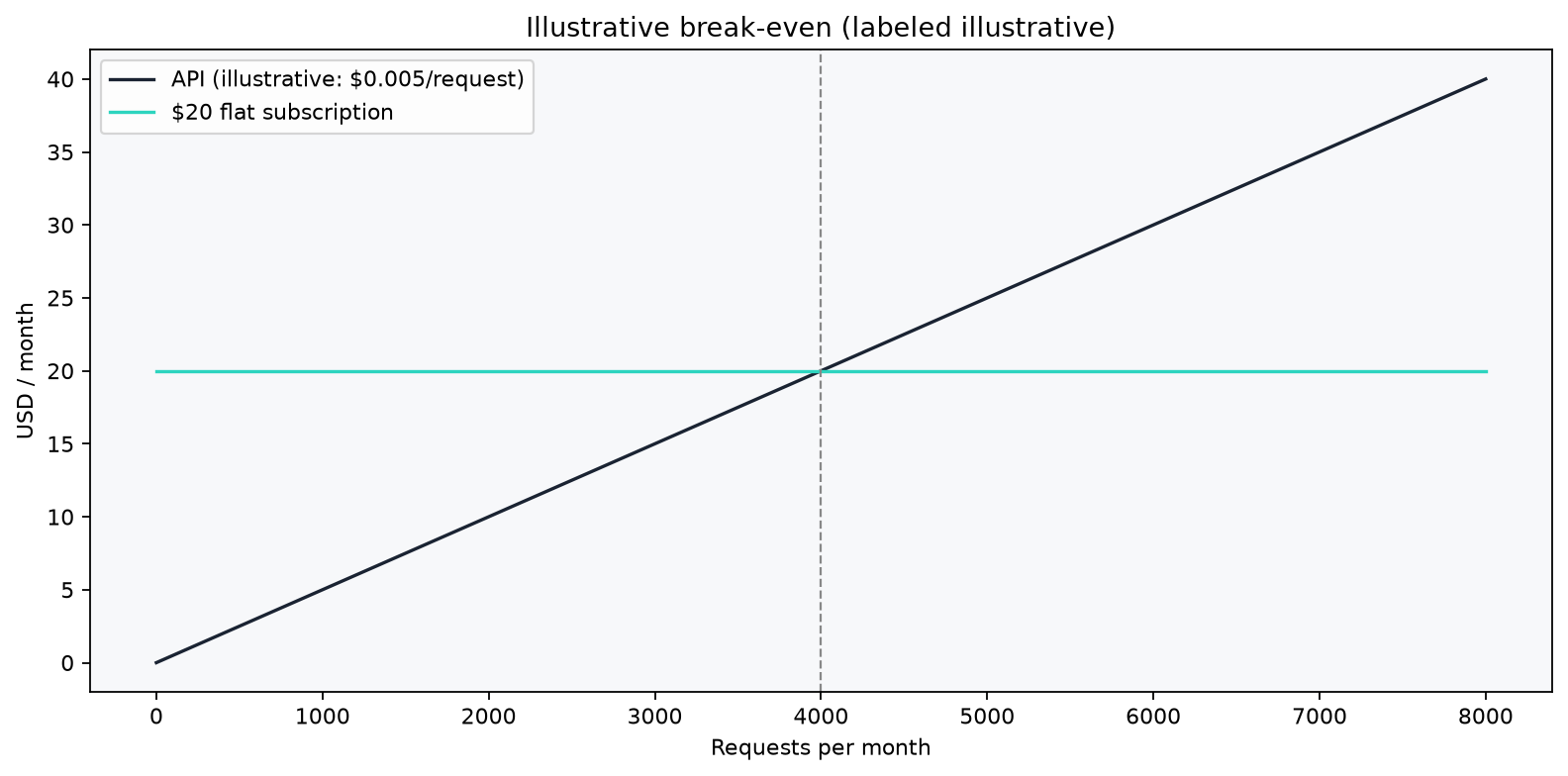
Figure 3 — Illustrative break-even: at low volume the API stays cheaper; past a usage threshold a flat subscription wins. Labeled illustrative.
How to estimate an API bill
- Estimate average input and output tokens per request.
- Multiply by requests per month.
- Divide each total by 1,000,000 and multiply by that model’s input and output rates.
- Add them, then check the provider’s usage dashboard after a week of real traffic.
Key takeaways
- Subscriptions are flat monthly fees; APIs bill per token for software you build.
- Coding tools (Cursor, Copilot) and chat apps (ChatGPT, Claude, Gemini, Grok, Kimi) have different plan grids — use official pages, not rough “~$20 / ~$100 / ~$200” shortcuts.
- API catalogs in this snapshot include OpenAI, xAI, Kimi, and Z.ai; re-check Anthropic and Google API pages for live token rates.
- Output tokens cost more than input; caching matters at scale.
- Always re-check official pricing before you commit spend.


