
The first three guides looked at models running on someone else's servers. But many capable models are open-weight — you can download them and run them on your own computer. This is called local inferencing. This guide explains what that means, why people do it, and how approachable it has become. 1
“Open source,” “open-weight,” and closed models
Models like GPT-6 and Claude are closed: you can use them only through the provider. Open-weight models publish their trained parameters so anyone can download and run them — for example Meta's Llama, Mistral AI's models, Alibaba's Qwen, and Google's Gemma. 2 Licenses vary: several (such as Mistral and Qwen releases) use the permissive Apache 2.0 license, while others carry their own community terms, so it is worth checking before commercial use.
Cloud vs. local: the trade-offs
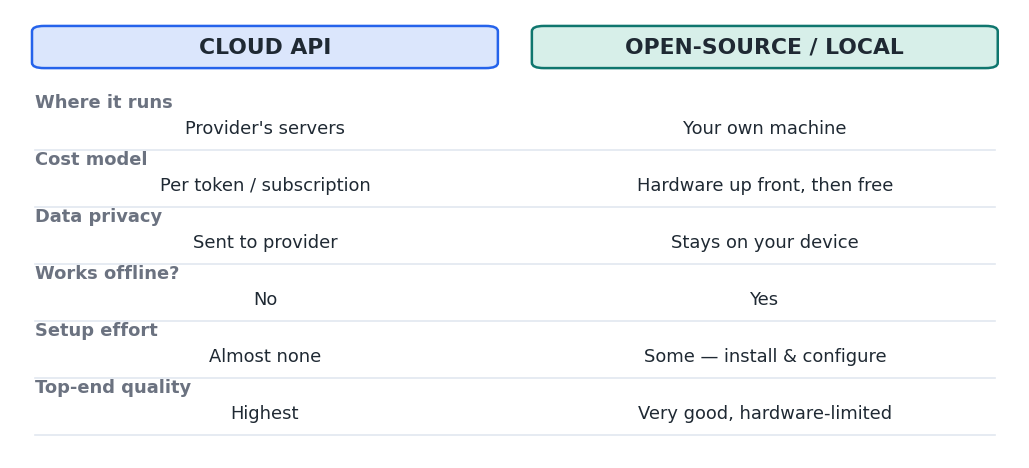
Figure 1 — Local inferencing trades some convenience and top-end quality for privacy, offline use, and no per-token cost.
The headline reasons to run locally are privacy (your data never leaves your machine), no per-token bills, offline access, and full control. The trade-offs are that you need capable hardware, the very largest frontier models remain out of reach on a home PC, and you maintain it yourself. 2
Quantization: how big models fit on small machines
A model's parameters are numbers, and storing them at lower precision — called quantization — dramatically reduces the memory needed to run it, for a small accuracy cost. 1 The common local format, GGUF, packages a quantized model into a single file. 3
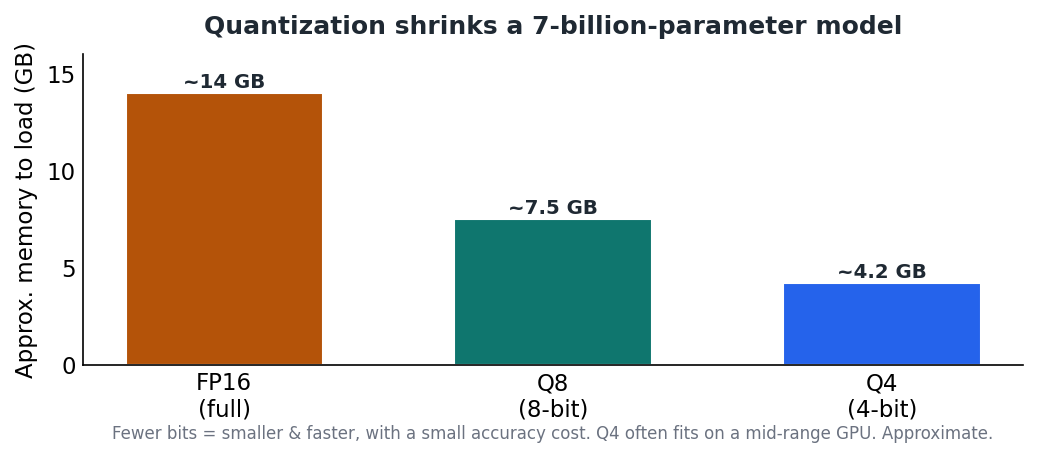
Figure 2 — The same 7B model at different precisions. A 4-bit (Q4) version often runs on a mid-range GPU.
The local stack
You do not need to assemble this by hand. A model file sits on top of an inference engine (most local tools use llama.cpp under the hood), wrapped in a friendly app.
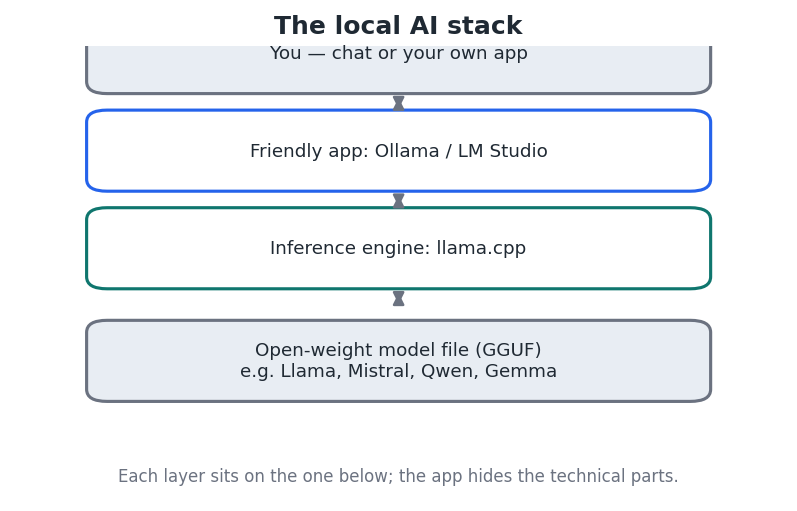
Figure 3 — The layers of a local setup. Apps like Ollama and LM Studio hide the technical parts.
How simple it can be
With a tool like Ollama, downloading and chatting with an open-weight model is a single command — it fetches the model and starts a chat:
Download and run an open-weight model locally
ollama run llama3...then just type your prompt at the prompt that appears
Example — running a local model with Ollama. LM Studio offers the same thing through a graphical interface. Beginners usually start with LM Studio (point-and-click) or Ollama (one command). Both run on Windows, macOS, and Linux, and both are powered by llama.cpp underneath. 1
What you can realistically run
As a rough guide, small models (about 3B parameters) need ~8 GB of memory, 7–8B models about 16 GB, and larger ones more. 1 A recent GPU with 8–16 GB of memory comfortably runs quantized 7–14B models at speeds comparable to cloud APIs — enough for chat, drafting, summarizing, and coding help. The detailed hardware picture is the subject of the Level 2 guides.
Key takeaways
- Open-weight models (Llama, Mistral, Qwen, Gemma) can be downloaded and run on your own hardware. 2
- Local inferencing offers privacy, offline use, and no per-token cost, in exchange for hardware and some setup.
- Quantization (via the GGUF format) shrinks models so they fit on consumer machines with minor accuracy loss. 3
- LM Studio and Ollama make getting started genuinely easy on Windows, macOS, and Linux.


