
A “local AI lab” is simply your own hardware for running models yourself. You do not need a server room — but you do need to understand the one number that decides everything: how much fast memory you have. This guide covers what to budget for and the realistic hardware paths, so you can match a setup to the models you actually want to run.
The one constraint that matters: memory
A model only runs if its weights fit in memory the processor can reach quickly — VRAM on an NVIDIA/AMD GPU, or unified memory on Apple Silicon and systems like DGX Spark. 1 A useful rule of thumb at 4-bit (Q4) precision is roughly 0.5–0.6 GB per billion parameters, plus a small buffer for the context window. 2
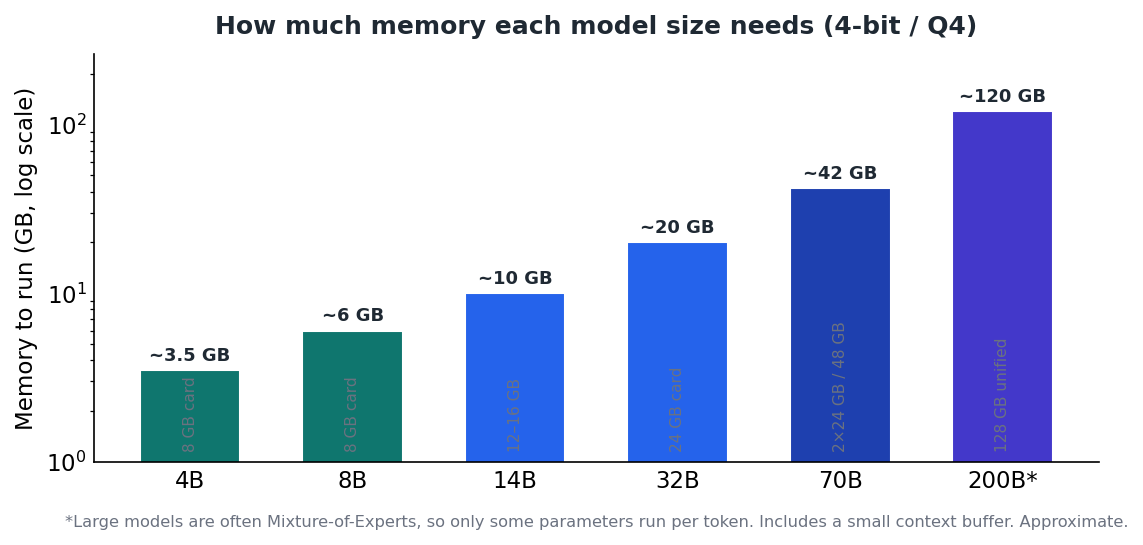
Figure 1 — Memory needed by model size at 4-bit. VRAM is the hard ceiling on what you can load.
One extra cost is the KV cache: as the context window fills, the model stores attention state for every token in memory alongside the weights. For long prompts, budget an extra 10–20% on top of the model size. 1
What you are actually budgeting for
- Fast memory (VRAM / unified). Sets the largest model you can run. The single most important spec.
- Memory bandwidth. How fast that memory can be read — the main driver of tokens per second once a model fits. 5
- System RAM. 16 GB minimum, 32 GB+ comfortable; used to load models and to offload layers that don't fit in VRAM (much slower). 1
- Storage. Model files are large (a 70B Q4 model is ~40 GB); an NVMe SSD keeps load times reasonable.
The core trade-off: capacity vs. speed
Every hardware choice trades memory capacity (how big a model fits) against memory bandwidth (how fast it runs). Discrete GPUs have very fast but limited memory; unified-memory systems offer huge capacity at lower bandwidth. 5
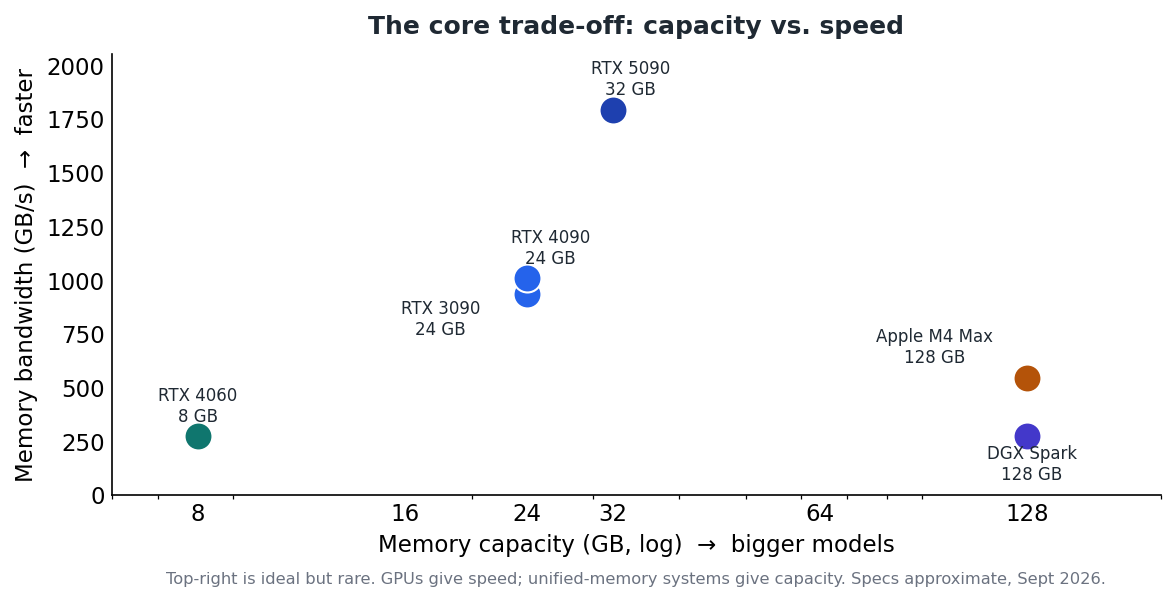
Figure 2 — GPUs deliver speed; unified-memory systems deliver capacity. Few options give both.
Your hardware options
- NVIDIA GPU (Windows or Linux). The best-supported path via CUDA. A used RTX 3090 (24 GB) is the value sweet spot; the RTX 5090 (32 GB) is the fastest consumer card. 3 4
- Apple Silicon (macOS). Unified memory doubles as VRAM, so an M-series Max/Ultra with 64–128 GB runs models that would otherwise need a data-center GPU; the MLX runtime is fastest here. 1
- AMD GPU (Linux). Supported through ROCm; strongest on Linux and useful for multi-GPU inference boxes. 1
- Unified-memory appliances. NVIDIA DGX Spark and similar GB10 systems pack 128 GB and can run 70B–200B models locally, trading raw speed for capacity — covered in its own guide. 5
- Cloud rental. Renting a GPU by the hour avoids buying anything and suits occasional heavy jobs; see the Level 3 guide on cloud GPUs.
Build tiers at a glance
Tier Example GPU / system Memory Runs comfortably Rough cost Entry RTX 4060 8 GB (or 16 GB Mac) 8–16 GB 3B–8B models; chat, coding help ~$300 GPU Mid Used RTX 3090 / 4090 24 GB Up to ~32B; 70B is tight ~$1,000 used High — speed RTX 5090 32 GB Up to ~45B on-GPU, fastest tokens ~$2,000+ High — capacity Apple M-series Max/Ultra or DGX Spark 64–128 GB unified 70B–200B, slower per token ~$4,000 Cloud Rented GPU (see Level 3) Per hour Anything, temporarily ~$0.30–3/hr Rough street prices as of September 2026. A 2026 memory shortage has made VRAM and RAM unusually expensive, so verify current pricing and favour machines with memory pre-installed.
How to choose: right-size to your models
Work backwards. Decide the largest model you realistically want to run, use the rule of thumb to get its memory need, then pick the cheapest option that clears it with room for context. 2 Most people are best served by a 24 GB GPU or a 64 GB+ unified-memory machine. Buy for the models you will actually use, not the largest that exists — and if your need is occasional, rent instead of buy.
Key takeaways
- Fast memory (VRAM or unified) is the hard limit; budget ~0.5–0.6 GB per billion parameters at Q4, plus 10–20% for context. 2
- Capacity and speed trade off: GPUs are fast but small; unified-memory systems are large but slower. 5
- A used RTX 3090 (24 GB) or a 64–128 GB Apple/GB10 machine covers most needs. 3
- Right-size to the models you'll run, and rent cloud GPUs for occasional heavy work.


