

The NVIDIA DGX Spark is a compact desktop “personal AI supercomputer” built around the GB10 Grace Blackwell Superchip. Its defining feature is 128 GB of unified memory, which lets a single small box run models far larger than any consumer GPU can hold — up to about 200 billion parameters, locally. 1 3 This guide covers what it is, when it makes sense, and how to set one up.
Specifications at a glance
Chip NVIDIA GB10 Grace Blackwell Superchip CPU 20-core Arm (10× Cortex-X925 + 10× Cortex-A725) GPU Blackwell, 6,144 CUDA cores, 5th-gen Tensor Cores Memory 128 GB unified LPDDR5x, ~273 GB/s bandwidth AI compute Up to 1 petaFLOP (FP4, sparse) Model capacity Up to ~200B parameters locally at 4-bit; ~405B with two units linked Storage 1–4 TB NVMe SSD OS & software DGX OS (Ubuntu 24.04-based), CUDA 13, NVIDIA AI stack preinstalled Networking ConnectX-7 (200 Gbps QSFP), Wi-Fi 7 Size & price 150 × 150 mm, 1.2 kg; ~$3,999–$4,699 (Sept 2026) Prices and availability vary by retailer and OEM (ASUS, Dell, HP, Lenovo, Acer ship equivalent GB10 systems). Verify before purchase.
What it's good at — and what it isn't
The Spark trades speed for capacity. Its unified LPDDR5x memory has modest bandwidth (~273 GB/s) compared with a discrete GPU like the RTX 5090 (~1,792 GB/s), so a 5090 is several times faster on models that fit in its 32 GB. 5 The Spark's advantage is that it can load models a 5090 simply cannot — and it is CUDA-native with NVIDIA's full software stack preinstalled.
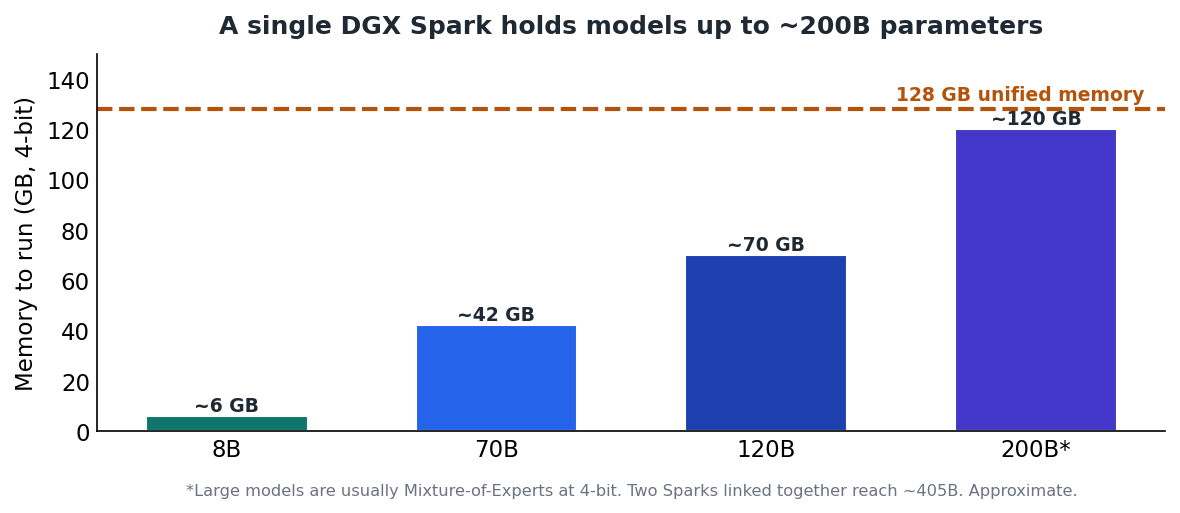
Figure 1 — 128 GB of unified memory comfortably holds models up to ~200B parameters at 4-bit.
Note Think of the DGX Spark as a developer prototyping appliance: a CUDA-native, 128 GB sandbox for large models at low concurrency — not a high-throughput production inference server.
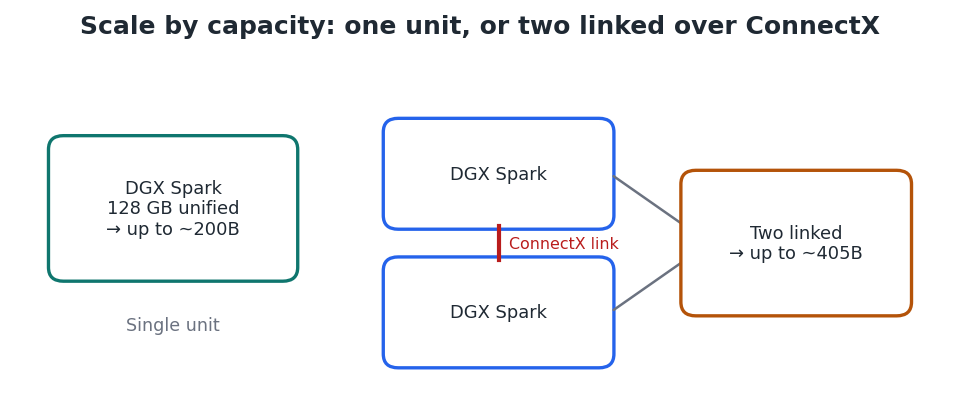
Figure 2 — Two units linked over ConnectX networking extend capacity to models around 405B parameters.
Project — Set up your DGX Spark and run a large model
- Connect it. Attach power and a network connection (Ethernet or Wi-Fi 7). For first-time setup, connect a monitor, keyboard, and mouse, or plan to complete setup headless over the network.
- Complete first boot. DGX OS (an Ubuntu 24.04-based Linux) guides you through creating a user, joining the network, and applying initial updates.
- Update the system. Open a terminal and bring everything current, then reboot:
sudo apt update && sudo apt full-upgrade -y
sudo reboot- Verify the GPU and CUDA. Confirm the Blackwell GPU and driver are visible, and that CUDA is present:
nvidia-smi # shows the GB10 / Blackwell GPU and memory nvcc --version # confirms the CUDA toolkit (13.x)
- Install a runtime. Ollama detects CUDA automatically, which is the quickest way to start:
curl -fsSL https://ollama.com/install.sh | sh- Run a large model. With 128 GB available you can load models that need dozens of gigabytes. Start with a 70B model, then try larger:
ollama run llama3.1:70b # ~42 GB at 4-bit — fits with room to spare- Optional — use NVIDIA's stack. For optimized or containerized workloads, NVIDIA's preloaded stack and NGC catalog provide ready-made containers and setup playbooks for inference and fine-tuning.
Note Everything runs on-premises, which is the other reason teams choose it: inputs never leave the device — useful for sensitive code, records, or unreleased model weights.
Is a DGX Spark right for you?
- Good fit: prototyping with 70B–200B models locally, CUDA development, and privacy-sensitive work that must stay on-device.
- Poor fit: maximum tokens/second on smaller models (a discrete GPU wins), or high-concurrency production serving.
Key takeaways
- The DGX Spark's 128 GB unified memory runs models up to ~200B locally — its main advantage over consumer GPUs. 3
- It favours capacity over bandwidth, so it's ideal for large-model prototyping at low concurrency, not high-throughput serving. 5
- Setup is standard Linux: update, verify with nvidia-smi, install a CUDA-aware runtime, and run.
- Two units linked over ConnectX reach ~405B-parameter models — see the Level 3 cluster guide.


