
The previous guide introduced the harness. This one looks at how it actually runs, then walks you through setting up a real one — Hermes Agent, an open-source framework that works with the local model you set up earlier.
Inside the loop
Each turn, the harness does the same four things:
- Assemble the context. It builds the prompt the model will see this turn — the task, relevant memory, and the results of previous actions — while staying within the model's context window. 2
- Let the model decide. The model responds with either a final answer or a request to use a tool, expressed in a structured format the harness can parse.
- Dispatch the action. If a tool was requested, the harness runs it — a search, a file read, an API call — and captures the result. The model can only ask; the harness executes. 1
- Observe and repeat. The result is added back into context and the loop runs again, until the model produces a final answer or a turn limit is reached.
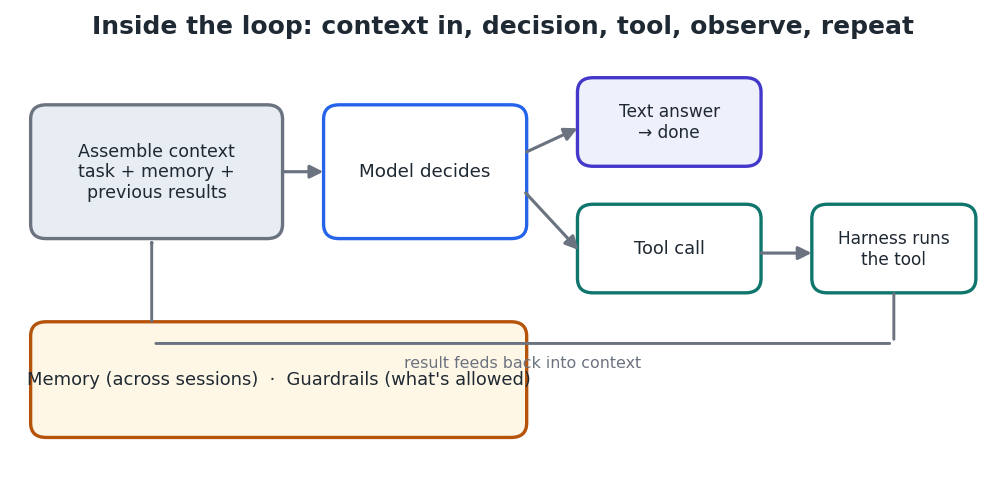
Figure 1 — One turn of the loop: assemble context, decide, run a tool, feed the result back.
Two supporting systems run alongside the loop. Memory persists useful information across turns and sessions, and context management compacts older material so the window doesn't overflow as work grows. 2 Guardrails decide which actions are permitted.
Meet Hermes Agent
Hermes Agent is an open-source (MIT) agent framework from Nous Research that runs in your terminal and is provider-agnostic — it can drive a cloud model or a local one. It defaults to a local model served by LM Studio and keeps persistent memory across sessions. 3 4 Its behaviour is shaped by a plain-text persona file called SOUL.md, plus skills and tools you add.
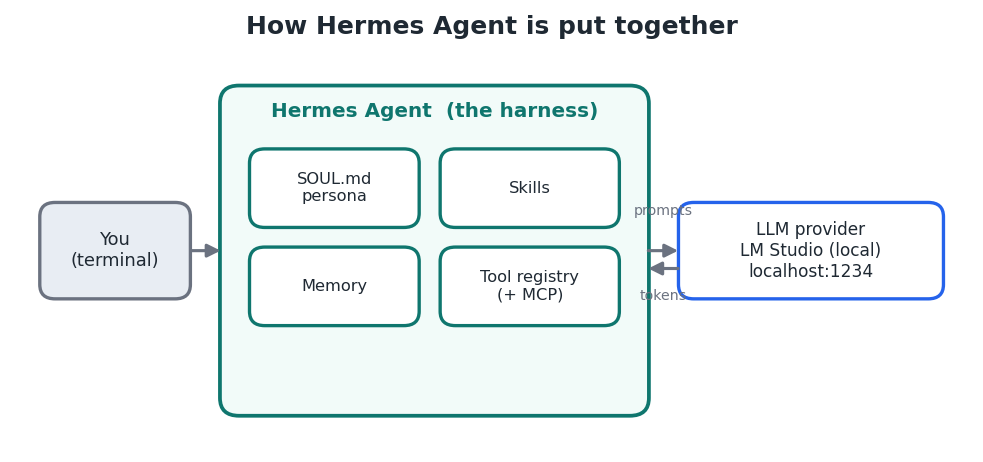
Figure 2 — Hermes is the harness: persona, skills, memory, and tools wrapped around a local model.
Project — Set up Hermes Agent with your local model
Prerequisite This project builds on the LM Studio setup from “Setting Up Local AI on Your Home Computer.” Have LM Studio installed before you start.
- Start LM Studio's local server. Load a capable instruction-tuned model, then enable the local server (default port 1234) so Hermes can reach it at http://localhost:1234.
- Install Hermes Agent. Run the official install script in a terminal:
curl -fsSL https://hermes-agent.nousresearch.com/install.sh | bashWindows On Windows, run Hermes inside WSL2 and enable “mirrored” networking so WSL can reach LM Studio on localhost:1234; otherwise WSL sits on its own isolated network and can't connect.
- Point Hermes at your local model. In the Hermes config (created under ~/.hermes/), set the provider to LM Studio's OpenAI-compatible endpoint. Match the exact keys to your version's config template:
~/.hermes/config.yaml (representative — check your version's template)
provider: openai-compatible
base_url: http://localhost:1234/v1
model: <the model id shown in LM Studio>- Give it a personality. Copy a SOUL.md preset (persona + operating rules) into place. Community presets exist for different roles:
cp templates/soul/engineer.md ~/.hermes/SOUL.md- Add a skill or two. Skills are self-contained folders the agent can use. Copy the ones you want:
cp -r skills/recall ~/.hermes/skills/- Start a session and give it a task. Launch Hermes and type an instruction; watch it reason, call tools, and report back:
hermes- Optional — verify the setup. A read-only check confirms Hermes is installed, SOUL.md loaded, and skills copied completely:
./scripts/verify_setup.sh Note Everything — model, memory, and tool calls — runs on your machine. Nothing is sent to a provider unless you deliberately configure a cloud model.
What you've built
You now have a working outer harness: a local model wrapped in a loop, a persona, memory, and skills. The next guides add two more pieces — MCP servers to connect it to your tools and data, and skills to package repeatable know-how.
Key takeaways
- Each turn the harness assembles context, lets the model decide, dispatches any tool call, and feeds the result back. 1
- Memory, context management, and guardrails run alongside the loop. 2
- Hermes Agent is an open-source, provider-agnostic harness that runs locally with LM Studio and is shaped by a SOUL.md persona. 3
- Setup is: serve a local model, install Hermes, point it at localhost:1234, add a persona and skills, then run.


