

When one GPU can't hold the model you want — or can't serve enough users — the answer is a multi-GPU workbench: two or more cards in one machine, pooling their memory. This guide covers how it works, the interconnect question that trips people up, and what to buy.
How it works: splitting a model across GPUs
The main technique is tensor parallelism: each layer of the model is split across the GPUs, which work on every token together and exchange a small amount of data at each step. The payoff is a combined memory pool — two 24 GB cards act as ~48 GB, enough for a 70B model at 4-bit (~40–42 GB) that no single consumer GPU can hold. 4
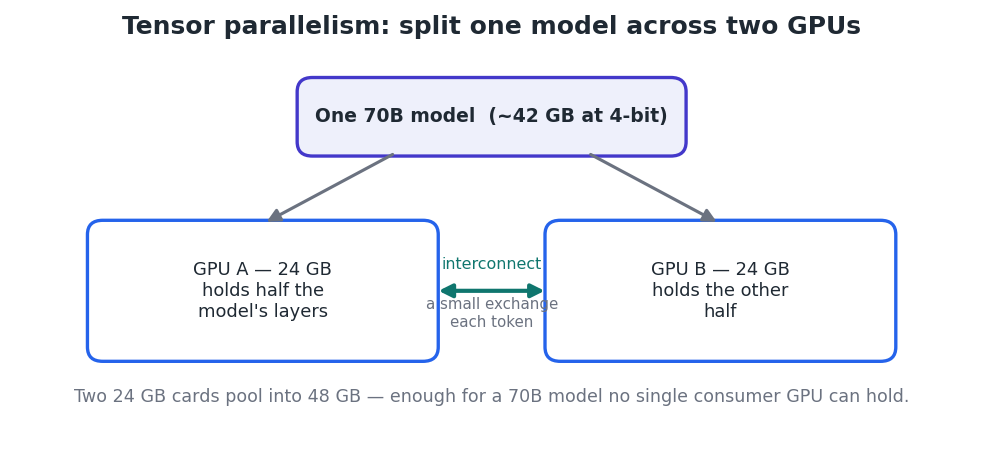
Figure 1 — Tensor parallelism pools VRAM across cards so a large model fits and runs.
A related technique, pipeline parallelism, assigns whole layers to different GPUs (or machines) in sequence; it's how clusters scale across nodes, covered in the next guide. 2
The interconnect question: NVLink vs PCIe
How fast the GPUs talk to each other matters, but less than people assume for inference. NVLink is far faster than PCIe, yet each token only needs to exchange a few megabytes, so a PCIe 4.0 x16 link is generally sufficient. 3
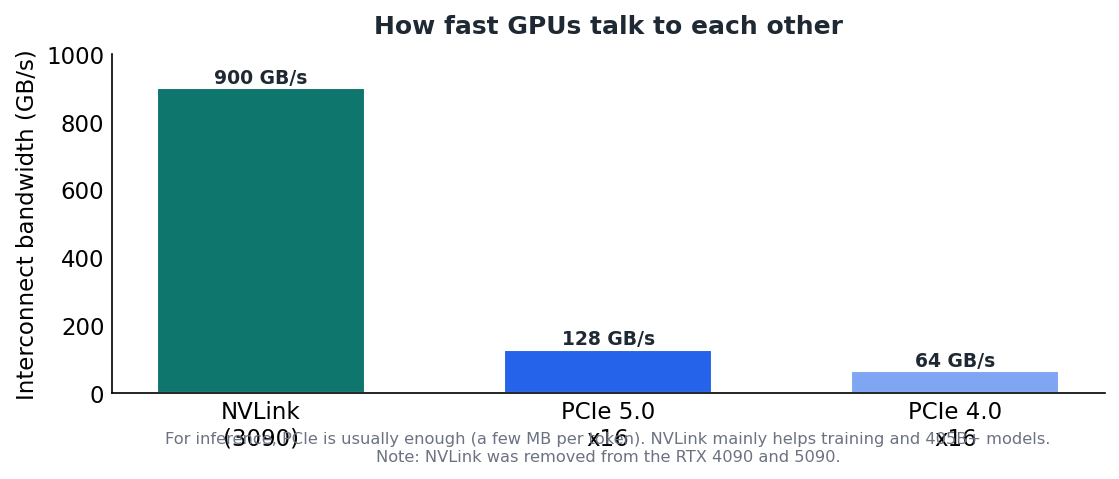
Figure 2 — NVLink is fastest, but PCIe is usually enough for inference. NVLink is gone from the 4090/5090.
Note NVLink mainly helps two cases: training/fine-tuning (gradients sync every batch) and very large 405B+ models. It exists on the RTX 3090 but was removed from the 4090 and 5090, which use PCIe only.
The reality of scaling
Two GPUs do not give double the speed. On consumer cards over PCIe, expect roughly a 1.5× speedup, with about 5–10% overhead from GPU-to-GPU communication. 5 The point of multi-GPU is usually capacity (running a model that wouldn't otherwise fit) and higher concurrency, not raw single-request speed. A well-tuned dual-4090 rig can serve Llama 70B at around 100 tokens/second. 1
What you need
- Matching GPUs. vLLM requires identical cards for tensor parallelism (same VRAM and compute). For mismatched cards, llama.cpp's --tensor-split is more flexible but runs at the slower card's pace. 2 3
- Motherboard & lanes. Room and PCIe lanes for two or more full-size cards; PCIe 5.0 is nice-to-have, not essential for two GPUs.
- Power. Budget ~350 W per card — a dual-GPU build needs a PSU rated for ~700 W of GPU draw alone, plus the rest of the system. 4
- Cooling & case. Adequate airflow for cards packed together; blower-style or spaced slots help.
Software: vLLM is the standard
vLLM provides continuous batching, PagedAttention, and native tensor parallelism behind a single flag. Serving a 70B model across two GPUs is one command:
Serve a 70B model across 2 GPUs with tensor parallelism
vllm serve meta-llama/Llama-3.1-70B \
  --tensor-parallel-size 2 \
  --gpu-memory-utilization 0.95 \
  --port 8000
OpenAI-compatible API is now at http://localhost:8000/v1
Set --tensor-parallel-size to the number of GPUs. llama.cpp offers --tensor-split for mixed cards; Ollama's multi-GPU support is weaker. Note vLLM scales efficiently to ~8 GPUs per node over NVLink; PCIe setups see diminishing returns beyond ~4 cards.
Build tiers
- 2 × 24 GB (48 GB pool). Used RTX 3090s (NVLink-capable) or RTX 4090s (PCIe) — the sweet spot for running 70B locally. 4
- 4 × GPU (96 GB+). For serving several 70B models at once, or long-context high-batch workloads. Significantly more cost, power, and cooling.
- Data-center card (A100 80GB / H100). A single 80 GB card holds a 70B model with no multi-GPU coordination — simpler software, far higher price.
Key takeaways
- Tensor parallelism pools VRAM across GPUs so large models fit; two 24 GB cards run a 70B model. 4
- For inference, PCIe is usually enough; NVLink mainly helps training and 405B+ models — and is absent on the 4090/5090. 3
- Expect ~1.5× (not 2×) from two GPUs; the real win is capacity and concurrency. 5
- Use identical cards with vLLM (--tensor-parallel-size N); plan power (~350 W/card) and cooling. 2


